I have deployed a form to collect information on drinking water assets in India. In the deployed form, there is a data point for funding- which has been given options, fully funded, partially funded or internally funded. If now, I want to change the options to include the name of the agency that funds the project and deploy it, would it affect the previous data that was collected?
Welcome back to the community, @rafglobal! Yes it will affect the data that is stored in your project. Hence, you will need to be very careful at this stage.
However, you could try the following to adjust your requirements:
Option 1: Archive your existing project, then redeploy a new one with the necessary changes. Once your survey is complete, you can merge the old and new data. This is the best and simplest option, as it avoids data issues. The only challenge may be during the data-merging process.
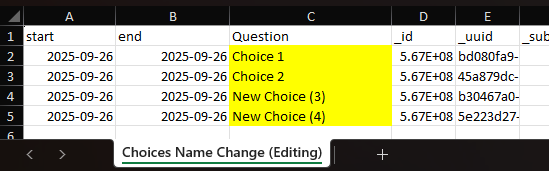
Option 2: Now, coming to option 2, which is a bit complex. If you have your choice’s name as follows:
Never reuse the XML values 1 or 2 for newly added choices. Leave them as they are. Instead, start with 3 and above, since those values haven’t been used in the choices’ XML values. If you assign 1 or 2, your data may get distorted. Strongly recommended: always test these changes in a dummy project before applying them to your live project.
If I go by the second option can I just keep the existing options as is and add other agency names as subsequent options, and redeploy. Would it help maintaining the rest of data as it is?
Here you can see that the labels and XML values have been retained. However, the labels are displayed based only on the latest version of the edited form. If you download the data in XLS format, the original labels are still retained.