Problem when editing data in a form with polygon

Hi team!

I’m having a problem editing data in Enketo. It won’t let me save because it says the polygon has a problem, even though the polygon hasn’t been modified. Apparently, the only way to confirm is to slightly adjust the polygon, removing some points that somehow cause a problem in the geometry. I already found a similar ticket, but it seems that my case is different (the solution by removing the last point and close the polygon doesn’t work, and we are using the last version of KoboCollect). The element in the survey is a geoshape, and it is into a repeated group.

I realized the problem is with polygons that have many points close together, in fairly small areas. KoboCollect likely allows the polygon to be captured without extensive validation, but the platform doesn’t accept it because some points aren’t congruent (also, they were probably captured with the option to capture a point every 5 seconds or less).
Here an example, and how I solved by removing a point into the geometry (not the first or last):

In this case, only one point was deleted, and it was fairly easy to identify, but sometimes it can be very tedious to find the point that’s causing the problems. What could I do to modify the rest of the form information without having to change every polygon?

Thank you in advance,

I’ve observed issues like this also, specifically Enketo is particularly sensitive to geoshapes, more so than KoboCollect. Specifically, KoboCollect will happily permit you to capture and submit self-intersecting polygons; eg

whereas Enketo explicitly checks that none of the polygon edges crosses any others, and will throw an error as soon as you try to edit this (!)

(although I’m not sure exactly what the situation was with your specific example that resulted in a somewhat different error…).

One thing you might try is to make it a geotrace instead of a geoshape (former can overlap itself). But that may not be feasible if, say, you intend to use the area() function to calculate the area of the farm.

Alternatively, if you wish to edit a submission with such a problematic polygon/geoshape, you could resort to performing a bulk edit on it instead, which basically turns off any Enketo validation checks.

Hi @Xiphware ,

Thank you for the quick answer.

I will do some test with geotrace, finally I’m calculating the area in the analysis phase, so it could be possible. I will try it, but it will probably be evaluated for the next data collection.

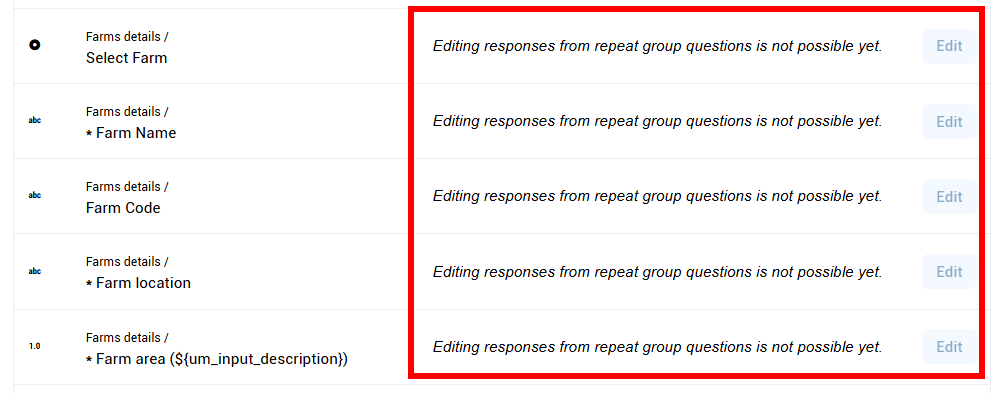
Modifying data with the bulk edit would be a great solution, but I just tested it and the Edit button is disabled because it doesn’t work with the repeated group:

Do you have any other ideas? Thank you so much!

If you make it a geotrace, you could also have a separate (hidden) calculation that converts the geotrace to a geoshape [just append the first coord onto the end to turn the geotrace into a valid geoshape…], and performs an area() function on that value instead. That would keep the area calculation entirely within your form, and avoid having to do it post-submission/analysis phase.

Edit button is disabled because it doesn’t work with the repeated group

Doh!

Thank you for the tips. I have a couple of questions more about geotrace:

  1. Can I modify the current question type of the element farm_polygon to geotrace, without lose data? It would permit to edit data after the change?
  2. Can you help me with the formula to append the first coord onto the end? I’m not sure about how can do it..

Finally, do you know if exists an external tool to edit data in KoboToolbox from an Excel or CSV?

Thank you again for your help!

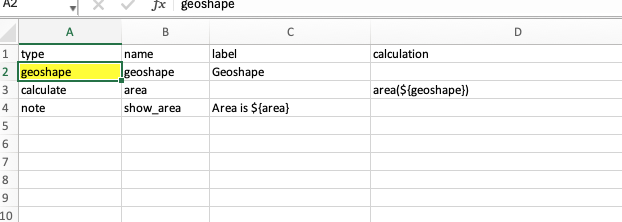
Apparently so (though changing data types isnt something I’d normally recommend…). Here’s a form with a geoshape, which I’ve submitted some data:

geoshape.xlsx (9.0 KB)

Now, I can replace this form with another, keeping the same geoshape form question, but changing its question type to geotrace (!).

geotrace.xlsx (9.2 KB)

The original data remains, but the field type has changed (as desired):

Now, when I edit this submission, the same field now appears as a geotrace instead (!), because its using the new version of the form [note, my ‘Geoshape’ isn’t shaded now].

After I hit submit, the new calculations are performed and the new calculated geoshape and area show up in the updated submission data.

So it would appear this could work - change your existing problematic (self-intersecting?) geoshapes into geotraces, by changing the question type in the form to a geotrace and adding a new calculation to calculate the geoshape instead (by effectively closing the polygon programmatically).

Give it a go and please report back. That said, this ‘trick’ is probably not something I would recommend doing normally - changing question types in forms is highly unusual and is going to be prone to error. Fortunately, a geoshape can be reinterpreted as geotrace, so it not an issue in this particular case.

Can you help me with the formula to append the first coord onto the end? I’m not sure about how can do it..

Have a look at my new form definition. The first calculation pulls the first point from the geoshape/geotrace:

first = substring-before(${geoshape}, ‘;’)

and the second calculation reconstructs a geoshape by adding this point to the end, with a semicolon delimiter:

newgeoshape = concat(${geoshape},‘;’,${first})

Thank you so much!

It is absolutely helpful, and the instructions are very clear. I will work on it asap and get you back with any feedback.

Best,